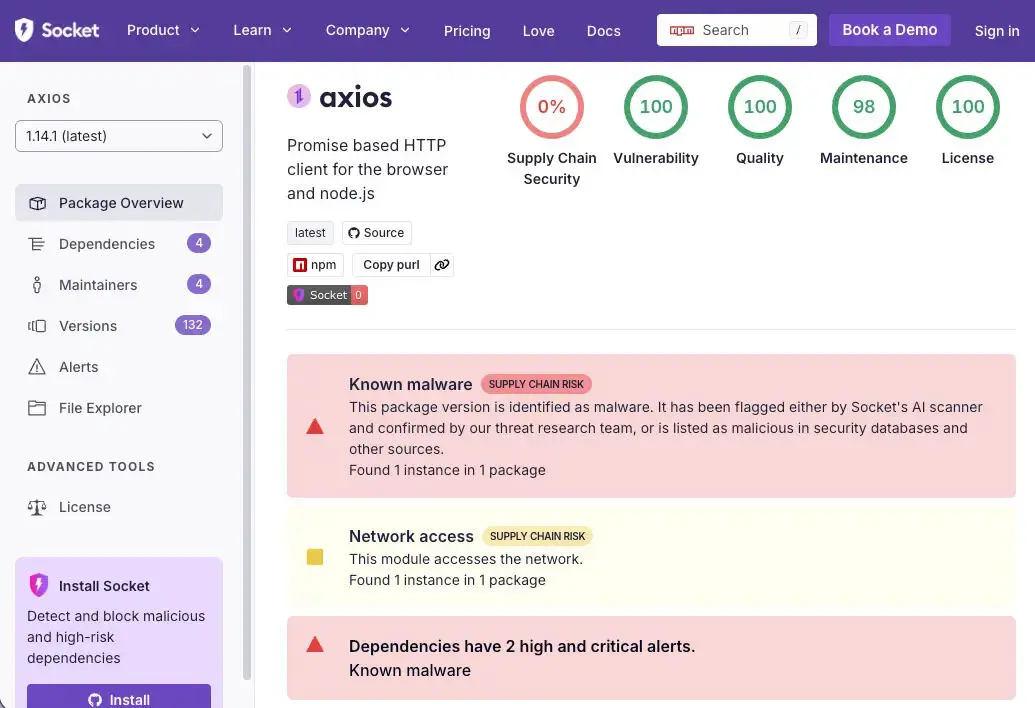
On March 31, the security research firm Socket detected an active supply-chain attack targeting the npm core package axios. The attacker compromised axios’s lead maintainer jasonsaayman’s npm account, published malicious versions, and injected malicious dependency packages to deploy a cross-platform remote access trojan (RAT), targeting macOS, Windows, and Linux systems.
Attack Chain Breakdown: The Complete Process from Account Takeover to RAT Self-Destruction
 (Source: Socket)
This incident was a carefully orchestrated multi-step supply-chain attack. First, the attacker compromised the maintainer’s account and changed the email to ifstap@proton.me, then used the stolen npm access credentials to manually publish malicious versions, fully bypassing axios’s legitimate GitHub Actions + OIDC Trusted Publisher release process. In the GitHub repository, the two malicious versions have no corresponding commits, tags, or release records.
The attacker’s preparations were equally precise: they controlled another account (nrwise, nrwise@proton.me) and, about 18 hours earlier, first published a clean decoy version plain-crypto-js@4.2.0 to establish a history, then released a malicious 4.2.1 version at 23:59 UTC on March 30.
After the malicious postinstall hook executed, the RAT dropper (setup.js) connected to the command-and-control server sfrclak[.]com:8000 to deliver platform-specific payloads. After execution, it self-destructed and replaced package.json with a clean stub, causing subsequent checks to find no traces of infection in the node_modules directory.
Key Technical Indicators of the Attack (IOCs)
Malicious package versions: axios@1.14.1, axios@0.30.4, plain-crypto-js@4.2.1
C2 server: sfrclak[.]com / 142.11.206.73 / [.]com:8000
macOS infection artifacts: /Library/Caches/com.apple.act.mond
Windows infection artifacts: %PROGRAMDATA%\wt.exe, %TEMP%\6202033.vbs
Linux infection artifacts: /tmp/ld.py
Attacker accounts: jasonsaayman (compromised), nrwise (attacker-created account)
Emergency Response Guide: Confirming Exposure and Remediation Steps
Because the malicious dropper self-destructs after execution, you can’t confirm infection by checking the node_modules directory. The correct approach is to directly check the lockfile (package-lock.json or yarn.lock) to see whether it contains version records for axios@1.14.1 or axios@0.30.4.
Safe version rollback: 1.x users should downgrade to axios@1.14.0; 0.x users should downgrade to axios@0.30.3, and after removing the plain-crypto-js directory from node_modules, reinstall dependencies.
If you find any RAT infection artifacts in the system (com.apple.act.mond, wt.exe, ld.py), do not attempt to clean them in place. Instead, rebuild from a known-good state and immediately rotate all credentials that may have been exposed, including npm tokens, AWS access keys, SSH private keys, CI/CD configuration keys, and .env file values.
For cryptocurrency and Web3 developers, axios is a core HTTP library for many DeFi protocol frontends, crypto asset management tools, and on-chain data query services. A compromised development environment may lead to wallet private keys, seed phrases, or API keys being leaked to attackers—so it’s recommended to prioritize reviewing and rotating all sensitive credentials.
Frequently Asked Questions
How do I confirm whether I’ve installed an affected axios version?
Because the malicious dropper self-destructs after execution, you can’t confirm infection by checking the node_modules directory. You should directly check whether the lockfile contains records for axios@1.14.1 or axios@0.30.4, and verify whether a plain-crypto-js directory exists in node_modules. You can run npm list axios or directly search for the version strings in the lockfile.
What specific impact does this supply-chain attack have on cryptocurrency and Web3 developers?
axios is a commonly used HTTP library for Web3 front-end applications and DeFi protocol interfaces. A compromised development environment may expose sensitive credentials such as private keys, seed phrases, exchange API keys, or CI/CD configuration—so affected developers should prioritize reviewing and rotating all potentially exposed crypto-related credentials.
How can I protect against future npm supply-chain attacks?
Key preventive measures include: always using npm ci --ignore-scripts in CI/CD to disable postinstall hooks; pinning versions for critical dependency packages; regularly reviewing lockfile change records; and deploying tools such as Socket and Aikido to enable real-time malicious software monitoring for dependency packages.
Disclaimer: The information on this page may come from third parties and does not represent the views or opinions of Gate. The content displayed on this page is for reference only and does not constitute any financial, investment, or legal advice. Gate does not guarantee the accuracy or completeness of the information and shall not be liable for any losses arising from the use of this information. Virtual asset investments carry high risks and are subject to significant price volatility. You may lose all of your invested principal. Please fully understand the relevant risks and make prudent decisions based on your own financial situation and risk tolerance. For details, please refer to
Disclaimer.


